ADS-B API
The Contrails.org API enables authorized users to access a common ADS-B dataset for contrails research.
The underlying ADS-B data is provided by Spire Aviation.
E-mail api@contrails.org with subject Common ADS-B Access to learn more about how your organization can participate in this program.
[2]:
import os
[3]:
# Load API key
# (contact api@contrails.org if you need an API key)
URL = "https://api.contrails.org"
API_KEY = os.environ["CONTRAILS_API_KEY"]
HEADERS = {"x-api-key": API_KEY}
Telemetry
Note this endpoint can take up to 30 seconds to return depending on bandwidth
This endpoint returns 1 hour range of all global ADS-B telemetry data as an Apache Parquet file.
Input date must be an ISO 8601 datetime string (UTC) with hourly resolution, e.g. "2025-01-06T00". Any minute or second resolution is ignored.
See the ADS-B schema for the description of each data key in the Parquet file.
[4]:
import pandas as pd  # pip install pandas
import requests  # pip install requests
Get data for a single hour
[5]:
params = {
    "date": "2025-01-24T02"  # ISO 8601 (UTC)
}

r = requests.get(f"{URL}/v1/adsb/telemetry", params=params, headers=HEADERS)
print(f"HTTP Response Code: {r.status_code} {r.reason}\n")

# write out response content as parquet file
with open(f"{params['date']}.pq", "wb") as f:
    f.write(r.content)
HTTP Response Code: 200 OK
[6]:
# read parquet file with pandas
df = pd.read_parquet(f"{params['date']}.pq")

print("Number of unique flights:", df["flight_id"].nunique())
print("Number of unique waypoints:", len(df["flight_id"]))

df.head().T
Number of unique flights: 17103
Number of unique waypoints: 1093322
[6]:
| 0 | 1 | 2 | 3 | 4 | |
|---|---|---|---|---|---|
| timestamp | 2025-01-24 02:59:59 | 2025-01-24 02:59:59 | 2025-01-24 02:59:59 | 2025-01-24 02:59:59 | 2025-01-24 02:59:59 |
| latitude | -31.66246 | 27.088531 | 20.765417 | 43.788944 | 44.384766 |
| longitude | 116.229698 | -109.225761 | -95.561882 | -89.641899 | -117.870552 |
| collection_type | terrestrial | terrestrial | terrestrial | terrestrial | terrestrial |
| altitude_baro | 6325 | 33000 | 43000 | 10675 | 47025 |
| altitude_gnss | NaN | NaN | NaN | NaN | NaN |
| icao_address | 7C42D9 | 0D0E85 | 0D097A | A0100A | A00E0D |
| flight_id | 0a0ada0d-1e21-468c-a6a0-562cde6eaa70 | 87727924-7c55-4675-b9d0-e8057b2c1d0b | 5f7a2a23-3871-4110-b20c-4b0b2cd2b087 | 973c81f7-f031-4fdf-be67-d881e0b5d84f | 72834782-5aef-4bb3-a51b-c8de3343d3fb |
| callsign | NWK2991 | VTM1101 | LET7051 | PXG103 | KOW102 |
| tail_number | VH-NHN | XA-VFK | XA-MBO | N103BZ | N102VR |
| flight_number | None | None | None | None | None |
| aircraft_type_icao | F100 | B733 | LJ75 | C560 | C750 |
| airline_iata | None | None | None | None | None |
| departure_airport_icao | YGIA | MMHO | KMIA | KOMA | KVNY |
| departure_scheduled_time | NaT | NaT | NaT | NaT | NaT |
| arrival_airport_icao | YPPH | MMQT | MMTO | KATW | CYYC |
| arrival_scheduled_time | NaT | NaT | NaT | NaT | NaT |
| nic | NaN | NaN | NaN | NaN | NaN |
| nacp | NaN | NaN | NaN | NaN | NaN |
[6]:
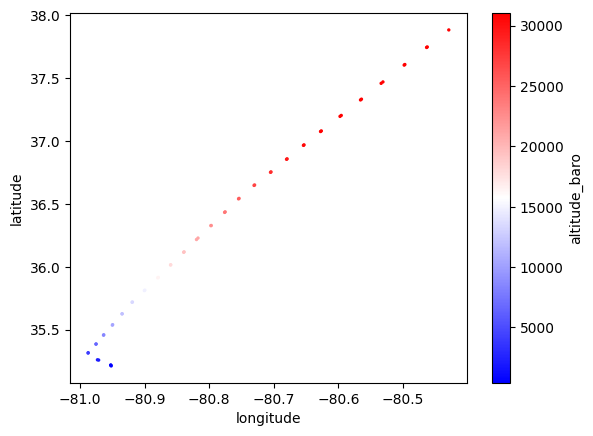
# select single flight and plot
flight_id = df.iloc[0]["flight_id"]
flight = df.loc[df["flight_id"] == flight_id]
flight.plot.scatter(x="longitude", y="latitude", c="altitude_baro", cmap="bwr", s=2);
Aggregate data over multiple hours
[7]:
start = "2025-01-15T02"
end = "2025-01-15T03"
times = pd.date_range(start=start, end=end, freq="h")
times_str = [t.strftime("%Y-%m-%dT%H") for t in times]
[8]:
for t in times_str:
    print(f"Downloading hour: {t}")

    r = requests.get(f"{URL}/v1/adsb/telemetry", params={"date": t}, headers=HEADERS)
    print(f"HTTP Response Code: {r.status_code} {r.reason}\n")

    # write out response content as parquet file
    with open(f"{t}.pq", "wb") as f:
        f.write(r.content)
Downloading hour: 2025-01-15T02
HTTP Response Code: 200 OK

Downloading hour: 2025-01-15T03
HTTP Response Code: 200 OK
[9]:
dfs = []
for t in times_str:
    dfs.append(pd.read_parquet(f"{t}.pq"))

df = pd.concat(dfs)

print("Number of unique flights:", df["flight_id"].nunique())
print("Number of unique waypoints:", len(df["flight_id"]))
Number of unique flights: 21240
Number of unique waypoints: 1944787
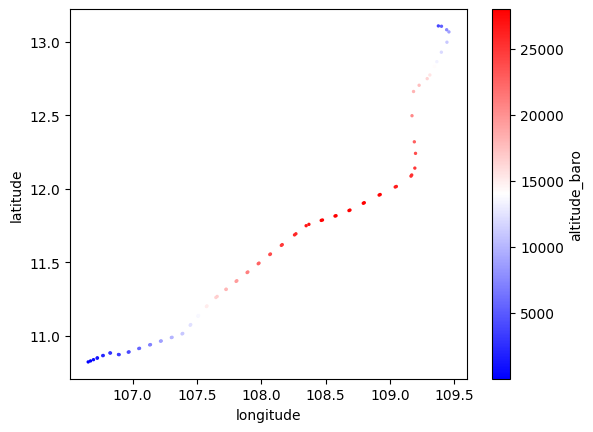
[10]:
# select single flight and plot
flight_id = df.iloc[0]["flight_id"]
flight = df.loc[df["flight_id"] == flight_id]
flight.plot.scatter(x="longitude", y="latitude", c="altitude_baro", cmap="bwr", s=2);
Bulk Load ADS-B into external datastore
This section requires a fresh notebook kernel. Restart the kernel if you have already run the section above.
This section will provide a tutorial that covers:
Fetching a range of ADS-B data from the Contrails.org API
Loading those data into an external database/datastore
This tutorial will focus on loading data into a Google BigQuery table. The same approach can be adapted to load these data into other database / datastores.
This process is useful if you want to perform advanced queries on the dataset.
Prerequisites
You must have a Google Cloud account, and the Google Cloud CLI (gcloud) installed on your machine.
You must also have set up a BigQuery table and given your account the required permissions to load data into this table.
[1]:
import json
import os
from pathlib import Path

# NOTE: grequests *must* be imported before requests, or you will see a MonekyPatchWarning
import grequests  # pip install grequests (for parallel REST requests)
import pandas as pd  # pip install pandas
from google.cloud import bigquery  # pip install google-cloud-bigquery
from google.cloud.bigquery import LoadJobConfig
[2]:
# Load API key
URL = "https://api.contrails.org"
API_KEY = os.environ["CONTRAILS_API_KEY"]
HEADERS = {"x-api-key": API_KEY}
Download ADS-B data files to your machine
Set target hours for ADS-B data, then fetch ADS-B data from the Contrails.org API in a parallel, saving parquet files to the local machine.
[3]:
# 6 hours of data
start = "2025-01-16T00"
end = "2025-01-16T06"
times = pd.date_range(start=start, end=end, freq="h")
times_str = [t.strftime("%Y-%m-%dT%H") for t in times]
[4]:
# Use `grequests` to send out parallel API requests
# (this cell can take minutes to evaluate depending on bandwidth)
req = (
    grequests.get(f"{URL}/v1/adsb/telemetry", params={"date": t}, headers=HEADERS)
    for t in times_str
)
responses = grequests.map(req, size=25)

# create local directory to store local parquet files
os.makedirs("adsb", exist_ok=True)

# Write out each hour as a parquet file in subdirectory `adsb`
for t, r in zip(times_str, responses, strict=False):
    print(f"{t}: {r.status_code} {r.reason}")

    # write out response content as parquet file
    path = Path(f"adsb/{t}.pq")
    with open(path, "wb") as f:
        f.write(r.content)
2025-01-16T00: 200 OK
2025-01-16T01: 200 OK
2025-01-16T02: 200 OK
2025-01-16T03: 200 OK
2025-01-16T04: 200 OK
2025-01-16T05: 200 OK
2025-01-16T06: 200 OK
(Optional) Create the target BigQuery table
If a target BigQuery table does not exist, then create one prior to inserting the target data.
The table must have a schema compatible with the fields present in the parquet ADS-B data.
You can create a table using the bq mk command (bq comes bundled with the gcloud CLI).
bq mk --table project_id:dataset_id.table_id adsb-schema.json
project_idis the GCP project ID for your account.dataset_idis the BigQuery dataset where you want to create a new table.
If the dataset does not already exist, you will have to create it first with the
`bq mk --datasetcommand <https://cloud.google.com/bigquery/docs/datasets#bq>`__ (or via the web Console…)
table_idis the table name for the new table you are creating.adsb-schema.jsonis the filepath to a local JSON file with the schema definition for the new table. Download the ADS-B schema provided in the documentation - this schema is compatible with the BigQuery API
curl -X GET https://apidocs.contrails.org/_static/adsb-schema.json > adsb-schema.json
[5]:
# !bq mk --table project_id:dataset_id.table_id adsb-schema.json
Load data into a BigQuery table
Assuming you have an empty BigQuery table created, the following loads local data into the BigQuery table on file at a time.
PRO TIP
To maximize BigQuery load speed, consider moving the dataset into a Google Cloud Storage Bucket.
See client.load_table_from_uri(..) or the
`bq loadcommand <https://cloud.google.com/bigquery/docs/batch-loading-data#permissions-load-data-from-cloud-storage>`__.Uploading from a GCS bucket will increase upload speed both due to the bucket being in the Google network (high uplink speed), and the commands above supporting wildcards for GCS URI paths.
[6]:
# Initialize BigQuery client
client = bigquery.Client()  # Uses your default GCP "project" - see `gcloud config list`

# Create table reference
project_id = "<project_id>"  # REPLACE WITH YOUR GCP PROJECT
dataset_id = "<dataset_id>"  # REPLACE WITH YOUR BQ DATASET
table_id = "<table_id>"  # REPLACE WITH YOUR BQ TABLE
bigquery_id = f"{project_id}.{dataset_id}.{table_id}"

# Load schema
with open("adsb-schema.json") as f:
    schema = json.load(f)

# Configure the loading job
job_config = LoadJobConfig(source_format=bigquery.SourceFormat.PARQUET, schema=schema)

for t in times_str:
    # read in parquet file
    path = Path(f"adsb/{t}.pq")
    print(f"Loading {t}")

    # Open the local parquet file
    with open(path, "rb") as f:
        # Start the load job
        load_job = client.load_table_from_file(f, bigquery_id, job_config=job_config)

    # Wait for job completion
    load_job.result()

    print(f"Loaded {load_job.output_rows} rows into {bigquery_id}")
Loading 2025-01-16T00
Loaded 1158825 rows into contrails-301217.sandbox.adsb3
Loading 2025-01-16T01
Loaded 1197240 rows into contrails-301217.sandbox.adsb3
Loading 2025-01-16T02
Loaded 1111672 rows into contrails-301217.sandbox.adsb3
Loading 2025-01-16T03
Loaded 966330 rows into contrails-301217.sandbox.adsb3
Loading 2025-01-16T04
Loaded 895878 rows into contrails-301217.sandbox.adsb3
Loading 2025-01-16T05
Loaded 736327 rows into contrails-301217.sandbox.adsb3
Loading 2025-01-16T06
Loaded 601999 rows into contrails-301217.sandbox.adsb3